Tuesday, November 29, 2005

Make Google's Personalized Home more compact in Firefox/Mozilla

Google's Personalized Home is a great "portal" to use as a homepage, adding and removing whatever content takes your fancy.

But even with a large monitor, it takes up a lot of screen real estate given the content. So I wanted to get rid of spacing where I thought it wasn't needed.

Using the site specific stylesheets in Firefox/Mozilla (David Baron's technical intro and a post on mozillaZine about customising sites ), it allows customising a site by overiding styles within the site by adding entries to a users usercontent.css file.

The following makes the Google Personalized Home page more compact, and draws a thin border around each content block:

@-moz-document url-prefix(http://www.google.com/ig) {
 div#nhdr > font > br { display: none; }
 body > table > tbody > tr > td > center > div { padding: 0 ! important; }
 body > table > tbody > tr > td > center > table { border-spacing: 0 ! important; }
 .modbox { padding-bottom: 0 ! important;
           border:         1px solid #3366cc ! important;
           margin-bottom:  5px ! important; }
 .mhdr { border: 0 ! important; }
 .mc { padding: 2px ! important; }
 .modbox > font > div { padding: 2px ! important; }
}
Update (2006-01-12): Made some more refinements, and works with the Greasemonkey script "Hide Personalized Google Search Box v2"
@-moz-document url-prefix(http://www.google.com/ig) {
  body {margin: 0;}
  #nhdr > font > br { display: none; }
  body > table > tbody > tr > td > center > div { padding: 0 ! important; }
  body > table > tbody > tr > td > center > table { border-spacing: 0 ! important; }

  #modules > table { width: 100% ! important;
                     border-spacing: 5px ! important;
                   }
  #modules > table > tbody > tr > td {display: none; }
  #c_1 {display : table-cell ! important; }
  #c_2 {display : table-cell ! important; }
  #c_3 {display : table-cell ! important; }

  .modbox { padding-bottom: 0 ! important;
            border:         1px solid #3366cc ! important;
            margin-bottom:  5px ! important;
          }
  .mhdr { border: 0 ! important; }
  .mc   { padding: 2px ! important; }
  .modbox > font > div { padding: 2px ! important; }

  body > table > tbody > tr > td > center > br { display: none; }
  #footer {display: none; }
}

Friday, November 11, 2005

Specifications for early 125cc/160cc Victa 2 stroke mower engines

Bore:
  • 125cc .............................. 53.975mm (2.125")
  • 160cc .............................. 61.493mm (2.421")
Stoke ...................................... 53.975mm (2.125")
Piston taper:
  • Bottom of Skirt -
    • 125cc ......................... 53.848mm (2.120")
    • 160cc ......................... 61.366mm (2.416")
  • Top ring land -
    • 125cc ......................... 53.721mm (2.115")
    • 160cc ......................... 61.239mm (2.411")
Piston rings:
  • Numer .............................................. 2
  • Size -
    • 125cc ...... 2.381mm x 53.975mm (0.093" x 2.125")
    • 160cc ...... 2.381mm x 61.493mm (0.093" x 2.421")
Big end bearing type:
  • Early models ......................... 15 steel rollers
  • Late models ...................... Caged roller bearing
Little end type:
  • 125cc .................................... Bronze bush
  • 160cc -
    • Early models ........................ Bronze bush
    • Late models ............... Needle roller bearing
Connecting rod material ................ Hardened alloy steel
Crankpin material ...................... Hardened alloy steel
Crankshaft type ........................ Alloy steel forgings
                                    15 deg taper on drive end
                                 0.5 in B.S.F thread both ends

Crankshaft main bearings:
  • Type .................................... Ball bearing
  • Size -
    • Magnet side ................................ 20mm
    • Drive side (early models) .....20mm inner 17mm outer
    • Drive side (late models) ..20mm inner 20mm L.D. outer
Crankcase oil seals:
  • Drive side (early models) ........................... 17mm
  • Timing side (early models) .......................... 20mm
  • Both side (late models) ............................. 20mm
Ignition timing .............................. 3mm (1/8") btdc
Breaker point gap ............................ 0.50mm (0.020")
Spark plug gap .............................. 0.635mm (0.025")
Spark plug type ............ Contact your nearest Victa dealer
Fuel requirement ......... 2 stroke petrol-oil mixture (25:1)

Wednesday, October 12, 2005

Victa Pace 160 Premier mower

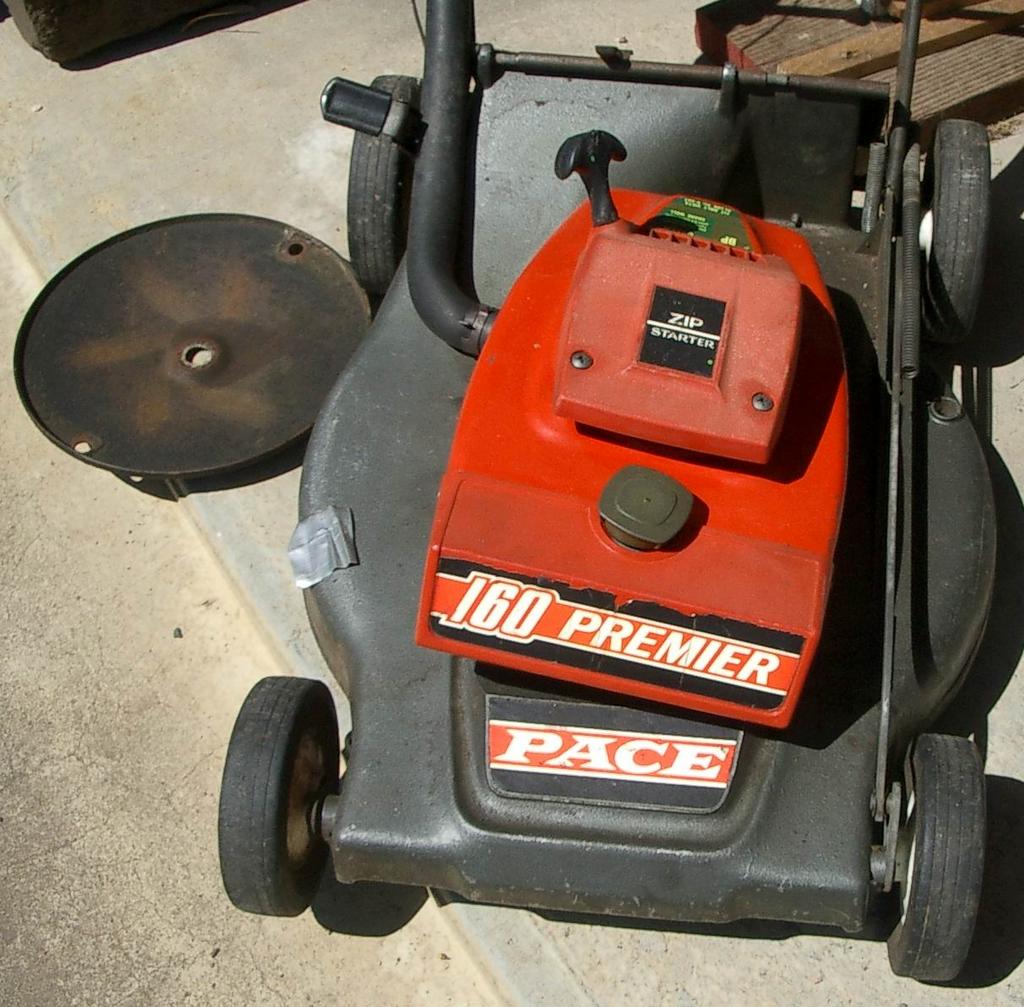
"Inherited" an old Victa from my chiropractor, used it for about a year. Great mower because it always started with half a pull :), but no catcher with it though.

Model details (printed on mower):

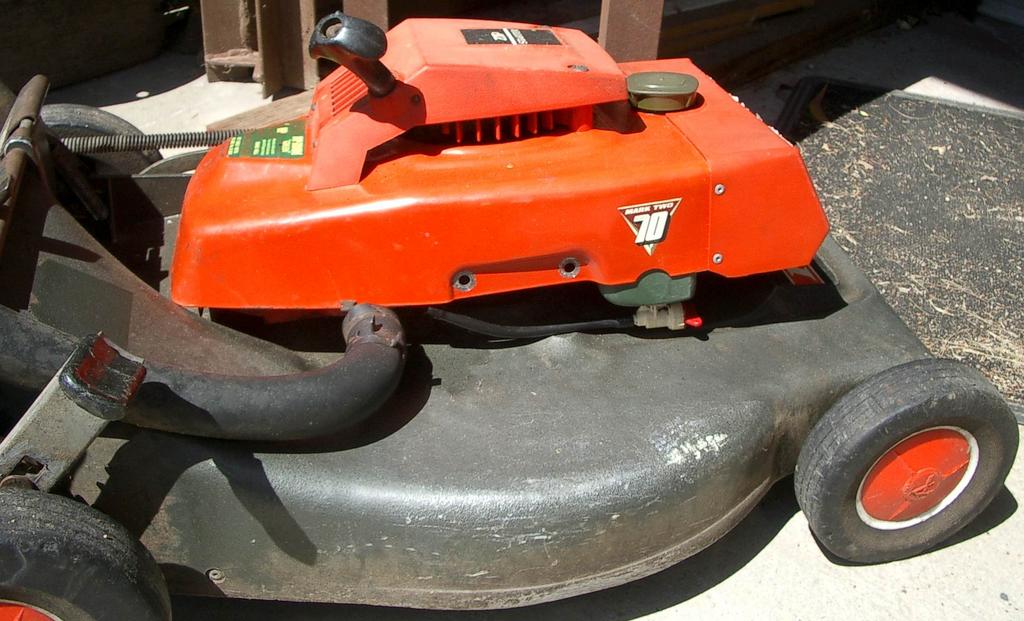
  • Pace - 160 Premier (Mark 2 - 70 series)
  • Fit only Victa blade No. 9-263
  • NGK - BP6E s
  • Engine No: 77 720 3 594
  • No model number on air filter casing :(

Based on some messages at OutdoorKing Bulletin board, its got a metal carby (G3) with the black governor sticking out the top. Very thick chassis compared to other 70 series I have seen. Has adjustable angle handles, using a plastic gear mating system.

Victa helpline reckons it is 1968-74, but they also recommended a CJ8 spark plug, when it's definitely a long plug. :-(


Fig 1.

Fig 2. Notice white plastic on bar between handle, might be used to secure a catcher

Fig 3.

Friday, September 30, 2005

Thursday, September 22, 2005

Make WinXP open folders/directories in explorer and not the folder view

I always hated how a default install of Windows XP made double clicking on folders on the desktop open in its own window, without the folder pane on the left.

Making each folder open in the same window is easy:
Explorer → Tools menu → Folder Options → Browse folders → "Open each folder in the same window" option

But the fact the opening a folder from desktop opened in plain folder view annoyed me, enough to create 2 shortcuts to each folder I was working on, one that was a normal folder shortcut (for navigating while in explorer) and the second one was to manually open explorer and to go directly to the wanted folder!!!!

Found the **obvious** solution the other day.

To make WinXP open each folder in Explorer (with the normal folder pane and any toolbar modifications), do this:
Explorer → Tools menu → Folder Options → "File Types" tab → Select "Folder" file type (not "File Folder") → Advanced button → click on "explore" action → click "Set Default"

Why didn't I think of it earlier :-(

Saturday, August 27, 2005

Respect physics above the law

AKA: Physics always wins.

This is a great quote for all bike riders and other vehicles on our roads:

Respect physics above the law - being 'in the right' is a philosophical debate that can kill you. Anticipate the worst from other road users and ride accordingly. Even with the law cyclists are vulnerable - it pays to keep alert and don't take risks.

by Ben Creagh, Cycle Epic Media Manager.
Located in the "commuting & the epic" article in the Cycle Epic 2005 booklet/application.

Thursday, June 02, 2005

Links: File Utilities and Resources

FILExt - The File Extension Source:
Great site to help find out what an unknown file is, based on it's extension. Provides detailed information like MIME types, applications that create it, links to resources etc.

WinMerge:
Freeware (and Open source) program to visually report on the differences between folder contents and for comparing individual files.
Doesn't do side-by-side folder compares, and limited to mainly text based file compares (it has some plugins for other formats). Better commercial programs include Beyond Compare and Araxis Merge (which has TRIPLE file and folder comparisons!!!!).

Unison File Synchronizer:
Interesting program to synchronise two seperate collections of files. More advanced than a directory compare program (like WinMerge), it tracks what additions/changes/deletions have occured in both locations and sends the changes to sync back up. Works a bit like rsync, but more orientated for the user and not an Administrator.

Wednesday, April 20, 2005

Securing WinXP by restricting Users access

Aaron Margosis' WebLog :
A series of articles on how to properly setup Windows XP (and other NT derived OS's) so users don't have admin privileges and can still function well. This is to massively reduce the security attack vector on computers. Will follow advice next time I reinstall WinXP.

LINK: Don't forget the Windows XP Security Checklist, provides a great checklist on Basic, Intermediate & Advanced measures you can take to secure you WinXP.

Friday, April 08, 2005

Stop bloody WinXP modifying folder (directory) dates

Optimise NTFS or Increase XP NTFS performance
I hate how XP changes the datestamp of folders with changing anything. Hopefully this fixes it and stops things like opening a Word document and suddenly the folder date changes.

BTW, TweakXP.com - Performance Tweaks & Tips has some good tips (& is a great starting place) on performance tweaks.

UPDATE: Turns out it's a "feature" of NTFS to alter the folder (and all parent folders) when files are changed (or added?). Seems there is no way to turn this off. FAT16 and FAT32 don't do this, so it might be better to make a FAT32 patition to put all user files on.

Optimising services in Windows XP

Windows XP Home and Professional Service Pack 2 Service Configurations by Black Viper and Windows XP Home and Professional Service Pack 2 Services Information
Seem to be a great example configs and references respectively.