Wednesday, June 21, 2006

Firefox Extensions I use (2006-06-21)

Update from my previous post Firefox Extensions I use.

Anyway, here is a list of the current Extensions I am using in Firefox 1.5.0.4:

  • Aardvark v1.1 (homepage)
    Lets you point to sections of a web page and delete, isolate, de-widify etc. Great for pruning a page before printing.
  • Adblock Plus v0.7.0.2 (amo homepage)
    Couldn't live without. While I have maintained my block list of many years, when setting up for other people, I use FiltersetG list (usually via the updater extension).
  • AJAX Yahoo! Mail v0.6 (amo homepage)
    Modifies Y! Mail so that I can open messages inline (meaning I can open many at once and see them all on the one page). It also lets you download attachments with one click and "instant reply" without having to load a new page.
  • Console2 v0.3.5 (amo homepage)
    Replaces the inbuilt JavaScript Console with the "Error Console", makes the console very useful and adds advanced features.
  • Download Manager Tweak v0.7.1 (amo homepage)
    Seems to add nice little tweaks to the Download Manager. Not as useful as Download Statusbar for me.
  • Download Statusbar v0.9.4.1 (amo homepage)
    Very nice, download's popup just above the statusbar (like the find bar), and I changed it so they disappear after 10 seconds. Great for directly opening ZIP, exe and PDF files after downloading them (which download by default now).
  • DownThemAll! v0.9.9.5.1 (amo homepage)
    Great when downloading lots of the same type of file linked from a page (ZIP downloads, images etc.).
  • Enhanced History Manager v0.5.8.05 (amo homepage)
    Ok, so I'm an old Mozilla App Suite user, and like my advanced History manager to prune my huge history list.
    Update: I'm running a custom EHM version from AnonEmoose that let's you filter by referrer.
  • Favicon Picker v0.3.0 (amo homepage)
    This is great for fixing favicon issues in bookmarks, especially for adding custom one's for Bookmarklets on the Personal Toolbar (and can therefore get rid of the text, making more fit).
    Seems a little un-maintained, but someone updated it for Firefox 1.5 and it works a treat.
  • Grab and Drag v1.5.3 (amo homepage)
    Instead of the cursor being used for selecting text (except for links), it makes the mouse pointer act like Acrobat Readers', where you click and drag the page around to scroll. Feels weird using a browser without it.
    Note: Doesn't seem to be updated on AMO, goto the homepage instead.
  • Greasemonkey v0.6.4 (amo homepage)
    Uses JavaScript to modify a pages content. Many JS scripts are available from userscripts.org. Never got into it until I found a few useful scripts at Userscripts that make Y! default to secure login, remebers Y! account names, hides the search section on the Google Personalized page (redudant with FF searchbox) and makes some improvements to All music guide.
    I've also created a few of my own.
  • JavaScript Debugger v0.9.87 (amo homepage)
    Great for serious JavaScript development. Need to try Firebug as well.
  • Linky v2.7.1 (amo homepage)
    Lets you open multiple links in a variety of ways. I use it by selecting links I'm interested and opening them all in tabs.
  • Live HTTP Headers v0.12 (homepage)
    Works well to debugging what the browser is sending and what the server returns (especially for redirects).
  • Magpie v3.2.5 (amo old homepage new homepage)
    Great for downloading content/pictures from a series of open tabs. Hopefully DownThemAll! will be able to do this one day.
  • Menu Editor v1.2 (amo homepage)
    Don't use this that much anymore, but used to aggressively prune the context menu to make it faster to use (by getting rid of stuff I don't use).
    Maybe should again, extensions add a lot of crap to the context menu.
  • Mouse Gestures v1.5 (amo homepage)
    Lets me use gestures, which for me involves shortcuts for going Back and Closing a tab/window (customised to use a down stroke).
    Also added a custom gesture to Go to first page in the tab's history (Snapback??) as L,R
  • SmoothWheel 0.44.7.20050605 (amo homepage)
    Makes scrolling so nice and smooth (includes de-acceleration when getting to the top or bottom, sweet).
  • Stylish v0.3.2 (amo homepage)
    Uses CSS to change the style of a page, similair to Greasemonkey. Many styles are available from userstyles.org.
    I used to put customisations in my usercontent.css and userchrome.css files, but with Stylish, I can see the changes instantly and toggle on and off.
    I use it to increase the size of the Firefox search box (used to use the Resize Searchbox extension, should be in FF v2), show a crosshair when over a link that opens a new window. I created a few styles, for removing clutter from Yahoo! mail and yourTV.com.au TV guides (I should submit those to userstyles.org one day.
  • Tab Preview v0.3 (homepage)
    Great use of the new Canvas feature in Firefox 1.5, it shows a thumbnail of each page when you mouse over non-current tabs. There are a lot of tab preview extensions out there, no idea if how this compares.
  • View Source Chart v2.0.02 (amo homepage)
    Useful when trying to analyse how a website is structured, when checking out how it works or for customising.
  • Web Developer v1.0.2 (amo homepage)
    Analysis and debugging pages. I use mainly for outlining block elements in HTML, validation and resizing the window for common sizes.

Retired Extensions:

  • Adblock v0.5.3.042 (amo homepage)
    Couldn't live without. Need to check out Adblock Plus, with heaps of improvements like whitelisting. While I have maintained my block list of many years, when setting up for other people, I use FiltersetG list (usually via the updater extension).
    Switched to Adblock Plus mainly coz of the small icon on status bar.
  • Forecastfox v0.9.2 (amo homepage)
    Used to like a lot, but the weather date provider (Accuweather) is usually way off for Melbourne weather, so I use the Bureau of Meteorology's plain text based forecast.
  • Performancing v1.2 (amo homepage)
    New extension that adds a Blog poster to Firefox, for Blogger, TypePad, LiveJournal, WordPress & MoveableType. Seems very slick and I like the way it acts as a docked bar at the bottom of a FF window, allowing you to flick between normal tabs without losing the editing window. This is my first post with it, so lets see how it performs (no pun intended). Update: publishing failed for some reason, so having to cut-n-paste into Blogger's editor. Also ask's for the master password 4 times on start, still not fixed in v1.1 (not sure if publishing is fixed now).

Old retired list:

  • Google Suggest - adds "Suggest" to the Firefox Google searchbox
  • Hash Coloured Tabs - creates new tabs with colour coding
  • Link Visitor - lets you selectively mark links as visited or unvisited
  • Resize Searchbox - creates a grippy for the Firefox searchbox so it can be resized

Friday, May 12, 2006

DIY Bike light systems

Have been thinking about upgrading my bike's lighting system for a while, as I have a Cateye HL-EL300 at the moment. It is apparently one of the first LED lights to meet Australian standards. It has 5 LED's that are very directional, and as I found out a few weeks ago on a rainy night, no real side visibility (a car didn't giveway at all).

DIY LED Luxeon lighting

I was initially looking at the DIY high power Luxeon LED's. I can't remember what got me thinking this, must of seen a mention of them at one point (maybe seeing the new Cateye double/triple high power LED lights, costing upwards of $450AU !!)
Update: My Google search History shows I hit the Wikipedia bike lighting page when looking up details for a Powerbeam halogen headlight from Torpedo7 (great site).

  • Wikipedia article: Bike Lighting
    As always, a Wikipedia article that is a good introduction to the subject that covers it broadly. It used to have ~4 links under the "Home Made LED lights" section (since removed):
  • 3W Luxeon bike light
    Very well made (and machined) LED light system, if only we all ad a lathe handy. Include a design diagram as well!!
  • 3W Luxeon bike light
    Another Aussie one, this time with parts straight out of a hardware store. Nice a cheap option, using some plumbing PVC pipe and heatsink from an Electronics store. A little dodgy though, like holding the batteries in a cut up VHS case and the switch just hanging, but then again its cheap, and the article provides heaps of construction details and part numbers.
  • DIYcycleLEDs Wiki
    A nice page detailing the prototyping & construction of 3x 3W Luxeons using 12x 2000mAh NiMH batteries (about $60AU worth). Nice photos and going into the finer details.
  • Twin 5W Luxeon bicycle lights MK2
    A whole series of articles, from the prototype to 3 different version. Given the detail that these articles go into & technical quality of the approach, I was thinking of following this route. Though maybe use 2x 3W Luxeon's, as they seem easier to drive and keep cool (& therefore service life).

Even Silicon Chip had an article on a Luxeon LED driver circuit.
Update:They now have a article on "Universal High-Energy LED Lighting System" which specifically uses a bike (a recumbent) as the example system, need to check it out big time!!!

Update (2006-07-11): Found the High-power LED mountain bike light page. Another Aussie LED project (are they all) so includes some good suppliers. Some nice design ideas here, especially the AA NiMH bottle.

DIY Halogen lighting

Then I stumbled on the Bicycle Lighting Systems page by Steven M. Scharf. It goes into so much detail (especially technical and sourcing parts) its scary. This site seems to have convinced me that a DIY Halogen system might be better and cheaper than a DIY LED light system. I think it was the "Watts Versus Lumens" section that convinced me of that, with the table comparing Halogen, LED and HID. Also the 5W LED Luxeon's sound as if they have a short life span. It also helped me reach the conclusion that for my night time commuting (with street lighting), it is better to be seen rather seeing (especially after the above mentioned close call)

Particular sections that are good are:

  • Seeing versus Being Seen
  • Watts Versus Lumens
    Includes a table of common Halogen (MR11 & MR16) globes, High power LED's and HID (High Intensity Discharge). It also includes data for when over-volting Halogen by 10% & 20% (it improves the effeciency, but trades life)
  • System Recommendations
    My current theory is to follow this almost spot on with:
    • Globes: 2x 20W MR16 Halogen (hopefully a 7/8o and a 24o, but sourcing is hard)
    • Headlamps: Cheap, compact set of car halogen driving lights, as the housing (turf the 50W globes)
    • Battery: 12V 5-7Ah SLA, hopefully housed in the bottle cage near the bottom bracket
    • (Thinking in future) a Xenon rear flashing light (like on trucks/trailers)
  • Headlights
    Has so many details about MR11 & MR16 Halogen globes it's not funny. Also includes the options for the headlamps, mainly different car driving light sets.
  • Batteries
    Includes discussion of choosing a battery system, includes techincal data and equations. Goes through the pros & cons of SLA and NiMH systems (NiMH are good for over-volting Halogens). Also talks about housing the battery on the bike.
  • Charger
    Again a discussion of the different types, models, requirements and options. Talks about a few DIY system additions, but nothing concrete.

While looking for sources of Halogen globes in Australia for Bec's NiteFlux Visionstick 5.5 (a MR11 6V 5W 10o that I can't find anywhere except $$bike shops$$), I found a link to another DIY Halogen system from a web forum.

the fat hippy's home made bike lights is an Australian site so the details of sourcing parts should be very useful. It shows 5 different iterations of the system, including part details, costs and sourcing. It also comes to the same conclusions as the Bicycle Lighting Systems page and myself :)
The tow bar cower housing seems pretty good, except for the hose clamps holding it together, kills the look if you ask me. But this page really is great, it goes into lots of the kind of details I like. The last version (Mk V) even has a digital controller circuit which uses one button to control the power and sounds like it helps a battery last longer.

Update: Just discovered the bikecurrent FAQ page from fat hippy's site. Seems very promising, with lots of details, equations, pros/cons of choices and many links to other sites.

Update (2006-07-11): Found the BIKE LIGHT 500 Lumen "Mt.Bike" for under 10 bucks by Veggiecycle page. Another great article on using products from hardware stores (Home Depot so US). The comment section is also good, with some useful links such as Home Depot Homebrew Headlight, using Landscape Spotlights and Batteryspace.com which has a great range of Battery packs, chargers, leads, mounts & bike light systems.

Update (2006-07-11): Found the Beenz Meanz LIGHTZ ???!!! page. While tin cans seems a little cheap, there's some great thrifty ideas here.

Globe sourcing

Had lots of trouble trying to find Bec's globe, as well as the one I want. Couldn't find a website (mainly US ones via Google) that had the globes I wanted (none had Bec's) for a good price that shipped to Australia :-(
Bec's globe: Halogen MR11 6V 5W 10o (ANSI code = FTB for 10o)
My globes: Halogen MR16 12V 20W 7-8o (ANSI = EZX) and 24o (ANSI = BBF)
Did find the following:

  • GMT Lighting (03) 9819 1777 Hawthorn
    MR16 in 13o (ANSI = ESX) for ~$10 (GE 5000hr model)
    MR16 in 38o for ~$8
    MR11 in 30o for ~$10 (FTD - Wide Flood maybe?)
  • Lamp Technologies (03) 9874 8100 Nunawading
    MR11 in 30o for ~$11
  • Koala Wholesale Lamps (03) 9326 8244 West Melbourne
    MR16 in 15o for $9.5 (GE)
    MR16 in 36o for $6.95
  • Calmatronics (03) 9326 5888 West Melbourne
    MR16 in 10o for $4 (Osram)
  • John R. Turk (03) 9318 9955 Yarraville (also in Fairfield
    MR16 in 12o for ~$2.5 (Compton)
    MR16 in 24o for ~$2.5 (Compton)
    MR16 in 38o for ~$2.5 (Compton)

Friday, February 10, 2006

ImageVenue.com Image Focuser (Greasemonkey Userscript)

My ImageVenue Userscript

I have been annoyed by the junk they surround an image with when viewing an image at www.imagevenue.com. In the past I created a series of "site specific stylesheets", which look something like this:

@-moz-document domain(imagevenue.com) {
  .adHeadline {display: none;}
  #mbtb {display: none;}
  IFRAME {display: none ! important;}
  BODY > P > FONT {display: none ! important;}
  BODY > BR {display: none ! important;}
  P { margin: 0 ! important; }
}

This was over a long time, but it still had issues. First was that I was still loading the IFRAME, then I realised that I could simply use Adblock (Addons @ Mozilla homepage) to block the IFRAME.

Second, was trying to stop the page from scaling large images to a maximum width of 720 pixels. Hey, I have a 21" monitor, I have no problem displaying anything larger than 720 pixels. The scaling was happening in a JavaScript (JS) function that was attached to the images 'onLoad' event, meaning it would scale after the image has loaded. This means you get the annoying effect of viewing the image as it downloads in it's normal resolution, then it abruptly scales and stuffs you around!!

So I tried to make a Greasemonkey (GM) "Userscript" that would use the scale function again to return it to normal resolution. Since I am new to Greasemonkey, this took a little bit of getting used to.

  1. I tried calling the scaleImg() function in the Userscript. No dice, since the Firefox JS console reported that I don't have access to the function (I later read that you need to use specific GM API calls to work in the page's "sandbox" to get to its JS functions).
  2. Tried copy-n-pasting the scaleImg() code directly into my Userscript so sandboxing isn't an issue. Didn't work, as a variable saved for later was needed (the original width of the image), but I didn't have access to that.
  3. Using Firefox's Document Inspector, I discovered that I can get to the original width by accessing its "naturalWidth" DOM property. This still didn't work.
  4. I then found out I needed to run my code after the scaling function has been run from the onLoad event. Using the Tip from the GM Authoring page, I used:
    window.addEventListener("load", function(e) {
      what = document.getElementById('thepic');
      what.width=what.naturalWidth;
    }, false);
    This worked!! Though I then realised...
  5. That I could just "view" the plain image by changing the browser location to the image!! (redirection)
    what = document.getElementById('thepic');
    document.location = what.src;
    GM scripts run after a page has downloaded, but before any onLoad events have occurred. This means that my code is called before the image is downloaded (and maybe before it starts downloading).

So, it turned out to be dead simple, why didn't I think of that Before!!!!

Wednesday, December 21, 2005

Firefox Extensions I use

I've blogged about this before Mozilla (+Firefox) user pref/extensions back in April 2004 (when I primarily used Mozilla App Suite).

Anyway, here is a list of the current Extensions I am using in Firefox 1.5:

  • Forecastfox v0.8.2.5 (amo homepage)
    Used to like a lot, but the weather date provider (Accuweather) is usually way off for Melbourne weather, so I use the Bureau of Meteorology's plain text based forecast.
  • Adblock v0.5.3.042 (amo homepage)
    Couldn't live without. Need to check out Adblock Plus, with heaps of improvements like whitelisting. While I have maintained my block list of many years, when setting up for other people, I use FiltersetG list (usually via the updater extension).
  • Enhanced History Manager v0.5.8.05 (amo homepage)
    Ok, so I'm an old Mozilla App Suite user, and like my advanced History manager to prune my huge history list.
  • SmoothWheel 0.44.7.20050605 (amo homepage)
    Makes scrolling so nice and smooth.
  • Aardvark v1.01 (homepage)
    Lets you point to sections of a web page and delete, isolate, de-widify etc. Great for pruning a page before printing.
  • Menu Editor v1.2 (amo homepage)
    Don't use this that much anymore, but used to aggressively prune the context menu to make it faster to use (by getting rid of stuff I don't use).
  • Mouse Gestures v1.0.4 (amo homepage)
    Lets me use gestures, which for me involves shortcuts for going Back and Closing a tab/window (customised to use a down stroke).
  • View Rendered Source Chart v1.5.02 (amo homepage)
    Useful when trying to analyse how a website is structured, when checking out how it works or for customising.
  • DownThemAll! v0.10.6 (amo homepage)
    Great when downloading lots of the same type of file linked from a page (ZIP downloads, images etc.).
  • Web Developer v1.0.1 (amo homepage)
    Analysis and debugging pages. I use mainly for outlining block elements in HTML, validation and resizing the window for common sizes.
  • Linky v2.7.0 (amo homepage)
    Lets you open multiple links in a variety of ways. I use it by selecting links I'm interested and opening them all in tabs.
  • Console2 v0.3.2 (amo homepage)
    Replaces the inbuilt JavaScript Console with the "Error Console", makes the console very useful and adds advanced features.
  • JavaScript Debugger v0.9.85 (amo homepage)
    Great for serious JavaScript development. PS. Had to use the altered version because its the only one to work with Firefox 1.5.
  • AJAX Yahoo! Mail v0.5 (amo homepage)
    Modifies Y! Mail so that I can open messages inline (meaning I can open many at once and see them all on the one page). It also lets you download attachments with one click and "instant reply" without having to load a new page.
  • Tab Preview v0.3 (homepage)
    Great use of the new Canvas feature in Firefox 1.5, it shows a thumbnail of each page when you mouse over noncurrent tabs.
  • Greasemonkey v0.6.4 (amo homepage)
    Tried a few times in the past but never used it for long. Then I found a few useful scripts at Userscripts that make Y! default to secure login, remebers Y! account names, hides the search section on the Google Personalized page (redudant with FF searchbox) and makes some improvements to All music guide.
  • Grab and Drag v1.0.1 (amo homepage)
    Instead of the cursor being used for selecting text (except for links), it makes the mouse pointer act like Acrobat Readers, where you click and drag the page around to scroll. Just starting to use it, and it's great.
  • Performancing v1.1 (amo homepage)
    New extension that adds a Blog poster to Firefox, for Blogger, TypePad, LiveJournal, WordPress & MoveableType. Seems very slick and I like the way it acts as a docked bar at the bottom of a FF window, allowing you to flick between normal tabs without losing the editing window. This is my first post with it, so lets see how it performs (no pun intended). Update: publishing failed for some reason, so having to cut-n-paste into Blogger's editor. Also ask's for the master password 4 times on start, still not fixed in v1.1 (not sure if publishing is fixed now).
  • (2006-01-27)Download Manager Tweak v0.7.1 (amo homepage)
    Trying out this for the first time. Seems to add nice little tweaks to the Download Manager. Will see if it is worth keeping...

Extensions used but no longer:

  • Google Suggest - adds "Suggest" to the Firefox Google searchbox
  • Hash Coloured Tabs - creates new tabs with colour coding
  • Link Visitor - lets you selectively mark links as visited or unvisited
  • Resize Searchbox - creates a grippy for the Firefox searchbox so it can be resized

Thursday, December 01, 2005

Firefox 1.5 released today

The Mozilla community finally released Firefox 1.5 today, with lots of improvements (mainly behind the scenes).

I'm impressed with the level of QA in this release, they had 3 real release candidates. In fact Firefox 1.5 is the exact same bits as Firefox 1.5 RC3 (which is what I'm using right now).

The things that interest me for this release include:

  • Lighting fast back/forward navigation
  • Improved update system (tiny binary diff patches)
  • Partial SVG support (wait for all the demo pages to spring up)
  • Gecko improvements (mainly CSS additions)
  • Plus lots of tiny stuff not worth mentioning

Already waiting for Firefox 2.0 (from the 1.8.1 Gecko branch) with its "Places" support (redoing bookmarks, history, feeds etc. into a new user interface and storing in a super fast SQLite DB).

Firefox 3.0 will come off the 1.9 branch, with its Gecko improvements (complete? SVG support, rewrite rendering using Cairo on all platforms, reflow rewritten) and the proposed tagging system for bookmarks (which might appear in Firefox 2.0).

Get Firefox! Download Firefox 1.5 now.

Tuesday, November 29, 2005

Make Google's Personalized Home more compact in Firefox/Mozilla

Google's Personalized Home is a great "portal" to use as a homepage, adding and removing whatever content takes your fancy.

But even with a large monitor, it takes up a lot of screen real estate given the content. So I wanted to get rid of spacing where I thought it wasn't needed.

Using the site specific stylesheets in Firefox/Mozilla (David Baron's technical intro and a post on mozillaZine about customising sites ), it allows customising a site by overiding styles within the site by adding entries to a users usercontent.css file.

The following makes the Google Personalized Home page more compact, and draws a thin border around each content block:

@-moz-document url-prefix(http://www.google.com/ig) {
 div#nhdr > font > br { display: none; }
 body > table > tbody > tr > td > center > div { padding: 0 ! important; }
 body > table > tbody > tr > td > center > table { border-spacing: 0 ! important; }
 .modbox { padding-bottom: 0 ! important;
           border:         1px solid #3366cc ! important;
           margin-bottom:  5px ! important; }
 .mhdr { border: 0 ! important; }
 .mc { padding: 2px ! important; }
 .modbox > font > div { padding: 2px ! important; }
}
Update (2006-01-12): Made some more refinements, and works with the Greasemonkey script "Hide Personalized Google Search Box v2"
@-moz-document url-prefix(http://www.google.com/ig) {
  body {margin: 0;}
  #nhdr > font > br { display: none; }
  body > table > tbody > tr > td > center > div { padding: 0 ! important; }
  body > table > tbody > tr > td > center > table { border-spacing: 0 ! important; }

  #modules > table { width: 100% ! important;
                     border-spacing: 5px ! important;
                   }
  #modules > table > tbody > tr > td {display: none; }
  #c_1 {display : table-cell ! important; }
  #c_2 {display : table-cell ! important; }
  #c_3 {display : table-cell ! important; }

  .modbox { padding-bottom: 0 ! important;
            border:         1px solid #3366cc ! important;
            margin-bottom:  5px ! important;
          }
  .mhdr { border: 0 ! important; }
  .mc   { padding: 2px ! important; }
  .modbox > font > div { padding: 2px ! important; }

  body > table > tbody > tr > td > center > br { display: none; }
  #footer {display: none; }
}

Friday, November 11, 2005

Specifications for early 125cc/160cc Victa 2 stroke mower engines

Bore:
  • 125cc .............................. 53.975mm (2.125")
  • 160cc .............................. 61.493mm (2.421")
Stoke ...................................... 53.975mm (2.125")
Piston taper:
  • Bottom of Skirt -
    • 125cc ......................... 53.848mm (2.120")
    • 160cc ......................... 61.366mm (2.416")
  • Top ring land -
    • 125cc ......................... 53.721mm (2.115")
    • 160cc ......................... 61.239mm (2.411")
Piston rings:
  • Numer .............................................. 2
  • Size -
    • 125cc ...... 2.381mm x 53.975mm (0.093" x 2.125")
    • 160cc ...... 2.381mm x 61.493mm (0.093" x 2.421")
Big end bearing type:
  • Early models ......................... 15 steel rollers
  • Late models ...................... Caged roller bearing
Little end type:
  • 125cc .................................... Bronze bush
  • 160cc -
    • Early models ........................ Bronze bush
    • Late models ............... Needle roller bearing
Connecting rod material ................ Hardened alloy steel
Crankpin material ...................... Hardened alloy steel
Crankshaft type ........................ Alloy steel forgings
                                    15 deg taper on drive end
                                 0.5 in B.S.F thread both ends

Crankshaft main bearings:
  • Type .................................... Ball bearing
  • Size -
    • Magnet side ................................ 20mm
    • Drive side (early models) .....20mm inner 17mm outer
    • Drive side (late models) ..20mm inner 20mm L.D. outer
Crankcase oil seals:
  • Drive side (early models) ........................... 17mm
  • Timing side (early models) .......................... 20mm
  • Both side (late models) ............................. 20mm
Ignition timing .............................. 3mm (1/8") btdc
Breaker point gap ............................ 0.50mm (0.020")
Spark plug gap .............................. 0.635mm (0.025")
Spark plug type ............ Contact your nearest Victa dealer
Fuel requirement ......... 2 stroke petrol-oil mixture (25:1)

Wednesday, October 12, 2005

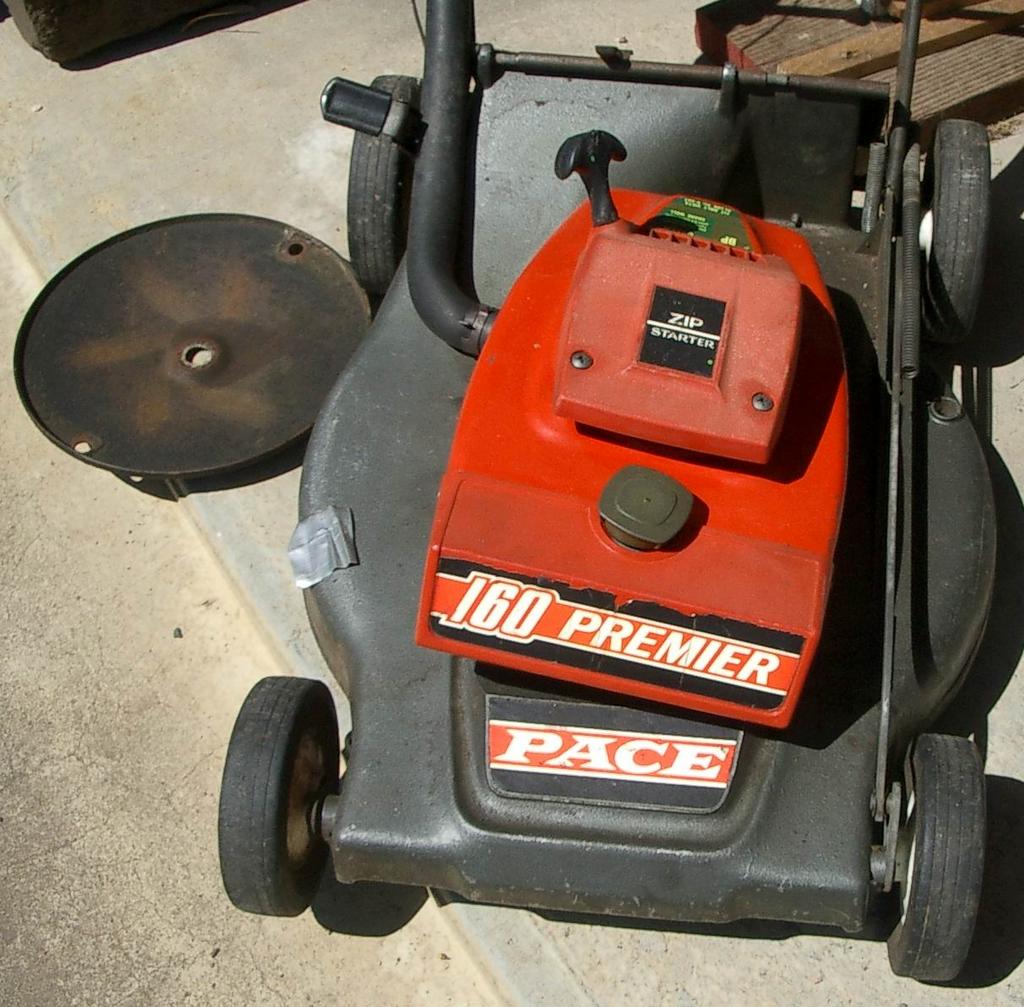
Victa Pace 160 Premier mower

"Inherited" an old Victa from my chiropractor, used it for about a year. Great mower because it always started with half a pull :), but no catcher with it though.

Model details (printed on mower):

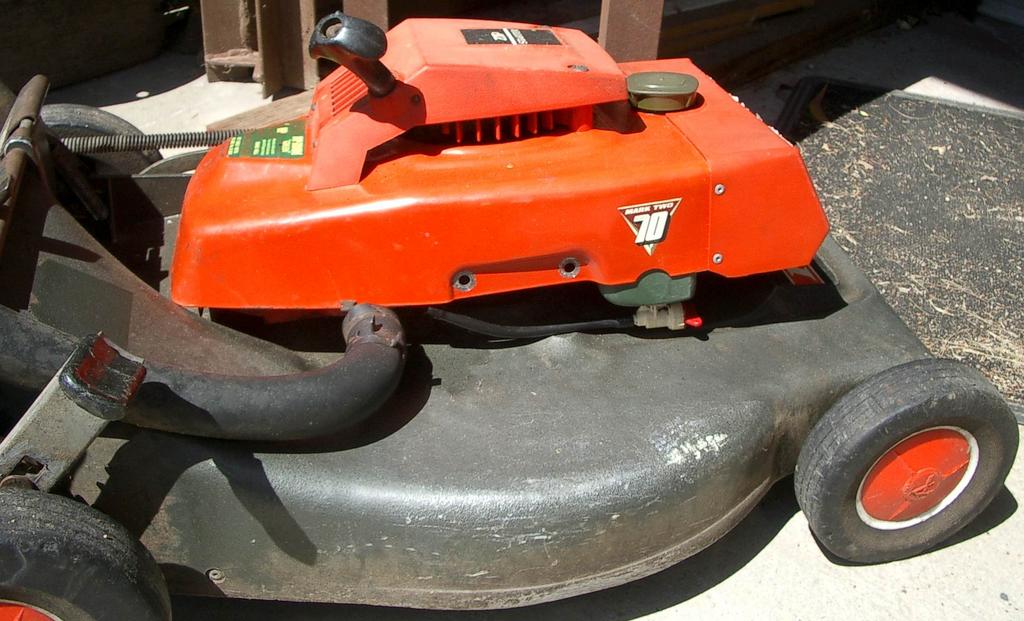
  • Pace - 160 Premier (Mark 2 - 70 series)
  • Fit only Victa blade No. 9-263
  • NGK - BP6E s
  • Engine No: 77 720 3 594
  • No model number on air filter casing :(

Based on some messages at OutdoorKing Bulletin board, its got a metal carby (G3) with the black governor sticking out the top. Very thick chassis compared to other 70 series I have seen. Has adjustable angle handles, using a plastic gear mating system.

Victa helpline reckons it is 1968-74, but they also recommended a CJ8 spark plug, when it's definitely a long plug. :-(


Fig 1.

Fig 2. Notice white plastic on bar between handle, might be used to secure a catcher

Fig 3.

Friday, September 30, 2005

Thursday, September 22, 2005

Make WinXP open folders/directories in explorer and not the folder view

I always hated how a default install of Windows XP made double clicking on folders on the desktop open in its own window, without the folder pane on the left.

Making each folder open in the same window is easy:
Explorer → Tools menu → Folder Options → Browse folders → "Open each folder in the same window" option

But the fact the opening a folder from desktop opened in plain folder view annoyed me, enough to create 2 shortcuts to each folder I was working on, one that was a normal folder shortcut (for navigating while in explorer) and the second one was to manually open explorer and to go directly to the wanted folder!!!!

Found the **obvious** solution the other day.

To make WinXP open each folder in Explorer (with the normal folder pane and any toolbar modifications), do this:
Explorer → Tools menu → Folder Options → "File Types" tab → Select "Folder" file type (not "File Folder") → Advanced button → click on "explore" action → click "Set Default"

Why didn't I think of it earlier :-(